
WinRAR Backup
An effective tool for everyday data protection tasks
About
WinRAR Backup is a lightweight backup utility that automates the process of creating compressed archive backups using WinRAR technology. It allows users to define backup rules, specifying which files or folders should be archived, where the archives should be stored, and how the process should be executed.
The application provides a simple, user-friendly interface where users can:
- Define backup rules (source, destination, archive name, and subfolder inclusion)
- Run backups manually or schedule them for automatic execution
- Configure settings to customize backup behavior
- Monitor operations through a detailed activity log
Each backup operation takes selected files from a specified source directory and compresses them into a WinRAR archive stored at the chosen destination. The process can include subfolders and supports repeated or incremental use depending on configuration.
WinRAR Backup is particularly useful for users who:
- Want a simple and efficient backup solution
- Prefer compressed archives over raw file copies
- Need quick setup and minimal system overhead
- Require basic automation without complex backup infrastructure
Overall, WinRAR Backup combines simplicity with the powerful compression capabilities of WinRAR, making it an effective tool for everyday data protection tasks.
Usage
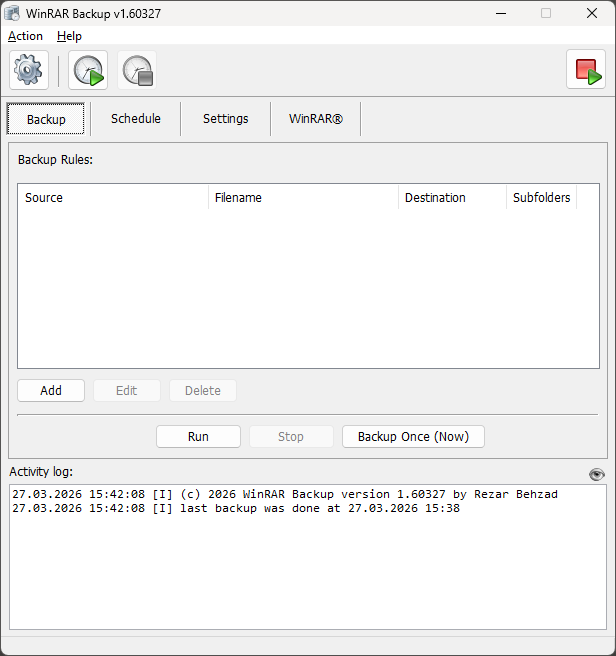
After starting the application this is how the main window is shown to you:
The central idea of WinRAR Backup is to define so called "Backup Rules" that specify what source directories get compressed into RAR archives. You can have multiple source folders compressed into individual archives or even merge them in a single archive. On each backup-run this list is processed from top to bottom.
To create a backup rule, follow these simple steps, first click on "Add" to see this dialog:
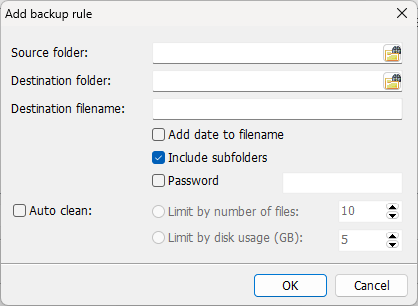
Here:
- Select the Source folder (the files you want to back up)
- Select the Destination folder (where the archive will be saved)
- >Enter a Destination filename (name of the archive)
- Choose additional options if needed:
- Add date to filename – appends the current date to the archive name
- Include subfolders – includes all subdirectories in the backup
- Password – protects the archive with a password
- Auto clean – limits stored backups by number of files or disk usage
- Click OK to save the rule.
The new rule will appear in the list. You can now run it manually using Run or Backup Once (Now), or use it with scheduled backups.
Use "Edit" and "Delete" buttons to modify the list of backup rules.
Download
Choose whether you prefer the installed or portable Version of this Software:
Schedule
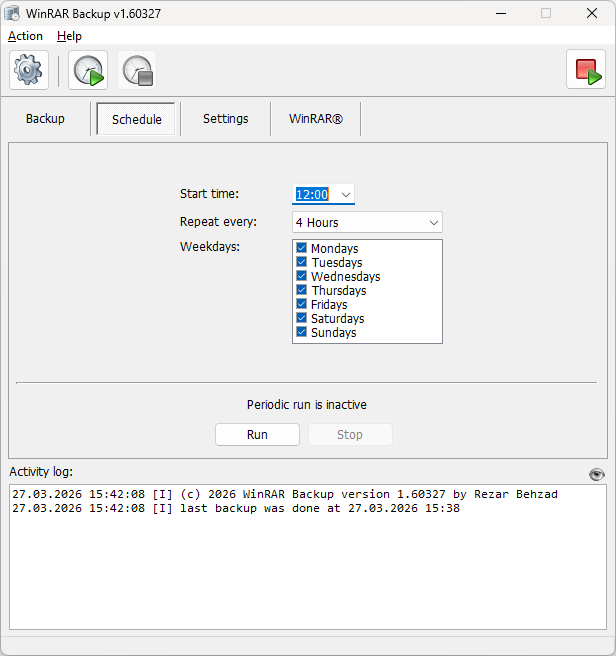
The Schedule page allows you to run backups automatically at defined times. Scheduling is controlled using the Play (start) and Stop buttons in the top toolbar. The schedule runs only while the program is open.
Configuration
- Start time – sets when the first backup should begin
- Repeat every – defines how often the backup repeats (e.g., every 4 hours)
- Weekdays – select the days on which backups should run
If you set "Repeat every" to a value above 24h, Weekdays settings are ignored
After configuring the schedule, click Play to activate it. Click Stop at any time to deactivate scheduled backups.
Program Settings
The Settings Page lets you configure program behaviour:
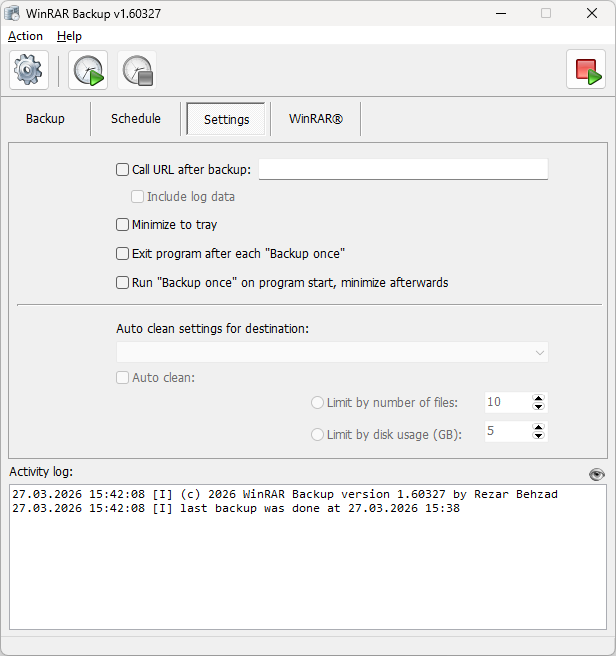
- Call URL after backup": Tick the checkbox to have WinRAR Backup perform an HTTP-POST request to the URL specified after each backup run (aka "Webhook"). Tick "Include log data" to also post details about the backup process. You can use this feature to monitor if your backups worked. This documentation has a chapter containing a PHP example code for such a Webhook.
- "Minimize to tray" controls whether the program remains in the taskbar or in the system tray when you minimize it
- "Exit program after each Backup once" does exactly what it says. This can be useful if you plan on running WinRAR Backup from an USB-Stick.
- "Run Backup once on program start, minimize afterwards" is useful if you plan on putting WinRAR Backup into Autostart
In the lower half of the screen you can control the auto clean settings on a per-target-folder basis - as a convenient alternative to clicking on individual backup rule items.
WinRAR Settings
The WinRAR settings page lets you configure WinRAR/compression related settings. You will be familiar with most of these settings when you already have been using WinRAR in the past:
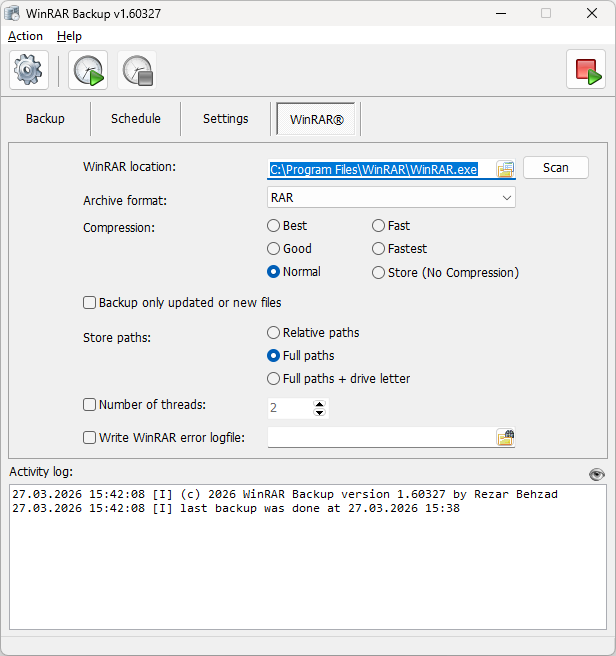
- "WinRAR location": Since WinRAR Backup does not automatically come with WinRAR itself, the program needs to know where WinRAR is installed. The program tries to find the current WinRAR installation, but you can either pick a different one or have the program scan for WinRAR on your harddisk
- "Archive format": RAR is the default file format. Other supported format are RAR4 (an older, more compatible Version of WinRAR) and ZIP
- "Compression": Better compression will result in longer execution times. If you are backing up data that is already compressed, it is recommended to use "Store" - which means "No Compression" and is the fastest way of creating an archive
- "Backup only updated or new files": If the data you are backing up only changes slightly, this will result in a quicker execution of the backup.
- "Store paths": If you pick "Full paths" or "Full paths + drive letter" this will help you on restore when you merge from different sources into one archive
- "Number of threads": Leave unticked to let WinRAR decide how the computational load is distributed.
- "Write WinRAR error logfile": The error logs written by WinRAR can help you troubleshoot issues when performing backups. If you don't specify a filename, error logs are written into WinRAR Backup's appdata folder
Webhook PHP Example
Find below the most simple PHP-code to implement your webhook. After receiving a call from WinRAR Backup it will send all submitted data via email. This code should run with almost every webhoster right out of the box. Just put this code on your webspace - do not forget to put your email-address in there.
<&php

// put your email address here
$to = "winrarbackup@fe1.com";

// get input parameters
$subject = "";
$message = "";
if (isset($_POST["subject"])) $subject = trim($_POST["subject"]);
if (isset($_POST["message"])) $message = trim($_POST["message"]);

// validate input
if ($subject == "") {
    // if parameters are missing, respond with "400 - Bad Request"
    http_response_code(400);
    echo("missing parameters");
    exit();
}

// send mail
if (!mail($to,$subject,$message)) {
    // if sending email failed, respond with "500 - Internal Server Error"
    http_response_code(500);
    echo("failed to send notification");
    exit();
}

http_response_code(200);
echo("ok");
System Requirements
WinRAR Backup does not have any meaningful or special system requirements. It does not even need an installation.
Hardware
- 4GB of RAM
- 50MB of free disk space
- Network Interface Card
Software
- Desktop: Windows XP SP2, Windows Vista, Windows 7, 8, 10, 11
- Server: Windows Server 2003 or higher.
- A fairly recent WinRAR installation
Download
Choose whether you prefer the installed or portable Version of this Software: